Provider Scheduling
Schedule patient visits using available appointment dates, times, providers, and facilities.

HealthVision brings appointment scheduling, patient confirmations, automated reminders, and appointment-status tracking into one connected practice management workflow.
From managing provider availability to reviewing appointment details and patient communication, HealthVision helps your practice team stay organized throughout the appointment lifecycle.
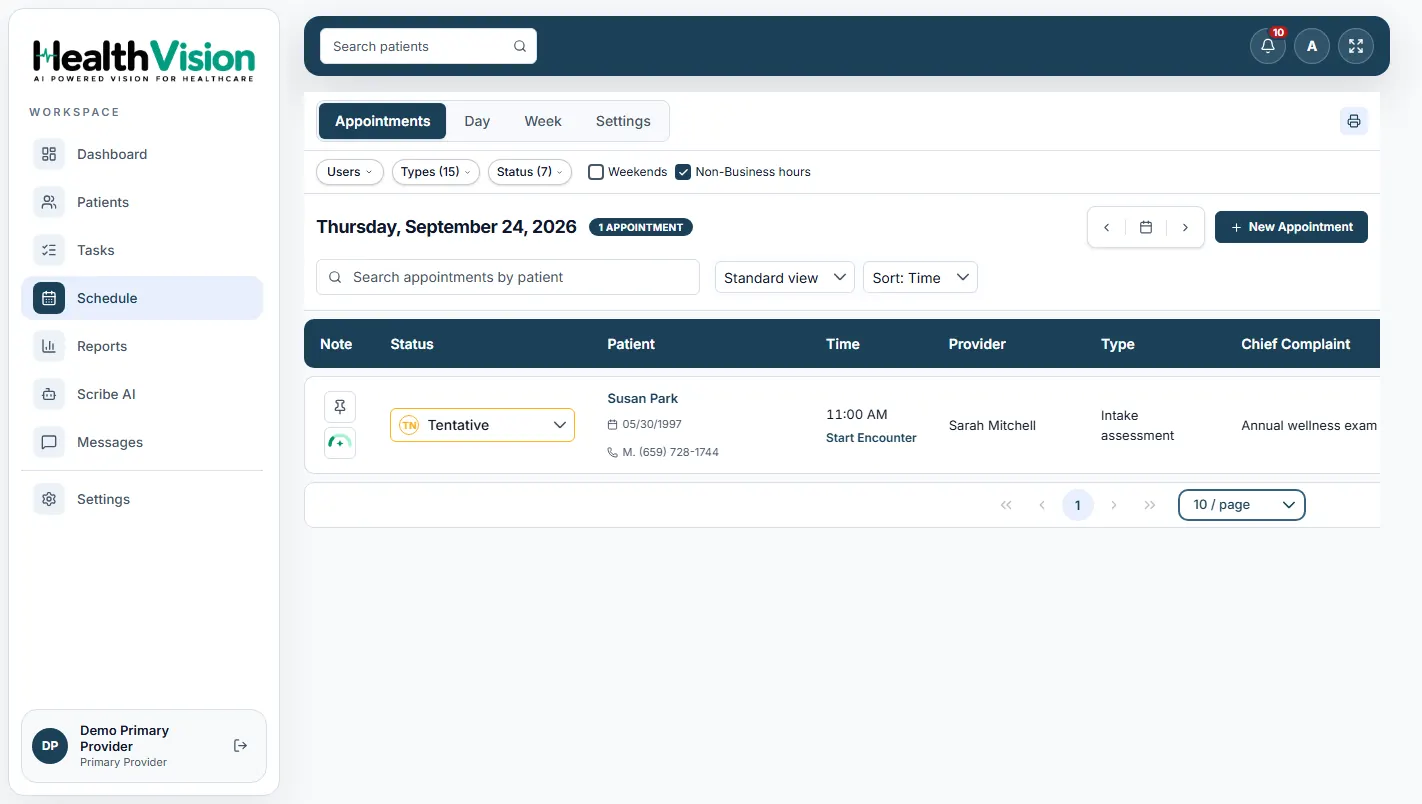
HealthVision provides appointment management tools that help practices coordinate provider schedules, patient visits, and administrative follow-up.
Schedule patient visits using available appointment dates, times, providers, and facilities.
Review confirmation information and update the appointment confirmation status.
Configure supported email, text, and voice notifications for scheduled appointments.
Review appointment statuses throughout the documented scheduling and check-in process.
Use appointment calendar views and reports to review relevant practice scheduling information.
Manage patient appointments through the documented Day and Week calendar views.
Review available provider time slots before booking a patient appointment.
Organize scheduled visits by appointment type and status.
Review appointment confirmation details and update confirmation information when appropriate.
The documented reminder configuration includes email notifications one week and 36 hours before scheduled appointments.
Support appointment notifications through the documented voice or text reminder option 24 hours before the appointment.
Authorized front-desk staff can manage appointment cancellations and rescheduling.
Review appointment information by date, status, provider, facility, and insurance eligibility.
Select the patient, provider, facility, appointment type, and available appointment time using HealthVision's Schedule module.
Access the appointment calendar to view the scheduled time, provider, patient information, confirmation status, and other relevant details.
Use the supported reminder configuration to send appointment notifications through the appropriate communication channels.
Authorized staff can review confirmation status, manage appointment changes, and update relevant appointment details.
When the patient arrives, update the appointment status through the documented check-in workflow and proceed toward the clinical encounter.
HealthVision includes configurable appointment reminder and notification settings that support patient communication before an appointment.
Supported notification timings from the HealthVision product documentation.
The documented configuration includes an email reminder one week before the scheduled appointment.
A second email notification is included 36 hours before the scheduled visit.
The documented configuration includes a voice or text reminder 24 hours before the appointment.
Configure supported booking-confirmation emails.
Manage supported communication preferences after collecting applicable patient consent.
HealthVision's documented scheduling and reporting features provide information that practice teams can use to review appointment activity.
Review appointments according to recorded scheduling statuses.
Review appointment information associated with individual providers.
Access relevant appointment information by facility.
Review recorded insurance eligibility information associated with appointments.
Use supported date selection and reporting criteria to review scheduled activity.
Access the documented Appointment & Eligibility Report for relevant appointment and practice management information.
Review the recorded appointment information in your existing scheduling tools and use the documented Appointment & Eligibility Report for reporting.
Learn more about appointment scheduling, reminders, confirmation tracking, and available reporting workflows.
Have another question? Contact our team ↗Discover how HealthVision brings provider scheduling, appointment confirmations, reminders, status tracking, and appointment reporting together in one practice management environment.