✨ NEW Let AI handle your notes with HealthVision AI Medical Scribe Explore AI (coming soon)
Sign in (coming soon) Watch demo (coming soon)
EHR SOFTWARE FOR NEW MEDICAL PRACTICES

Start Your Practice with the Right Tools. Build for What’s Next.

Opening a medical practice means making every workflow count. HealthVision brings electronic health records, appointment scheduling, clinical documentation, patient engagement, and billing tools together in one connected platform.

EHR & SOAP NotesPatient Schedulinge-PrescribingPatient PortalConnected Billing
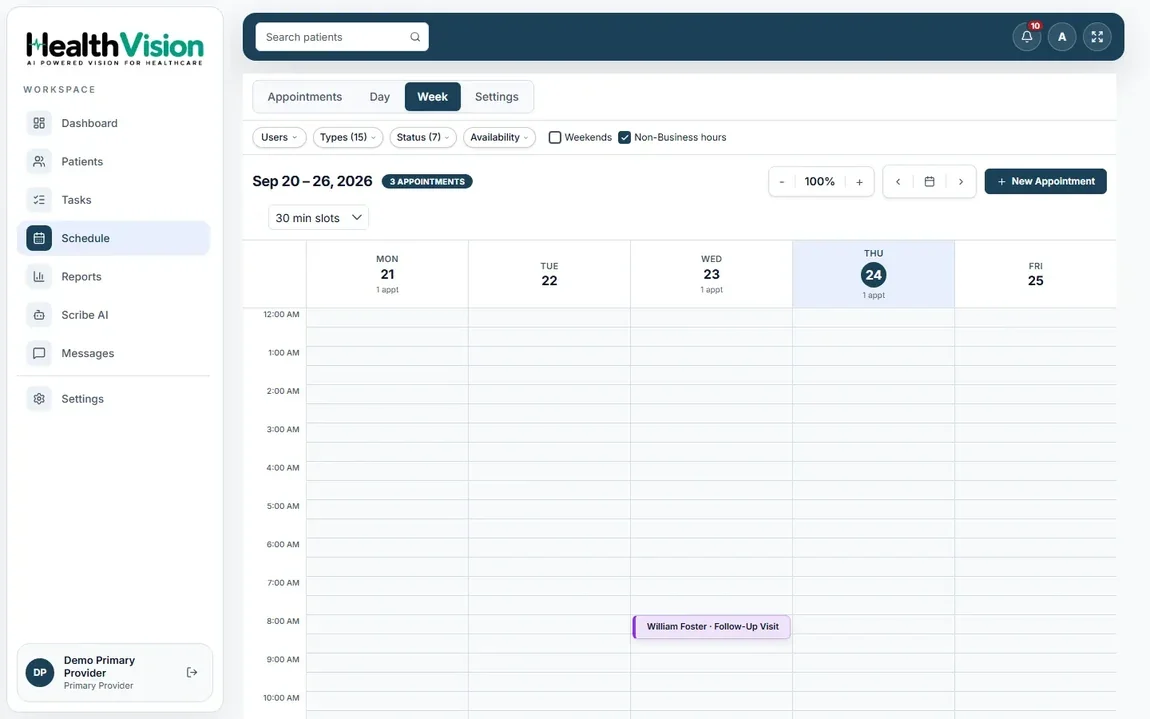
HealthVision practice workspaceACTUAL PRODUCT SCREEN
Actual HealthVision provider calendar and appointment scheduling interface
Core workflows, one connected platform
Illustrative photograph of a physician preparing to run a medical practice; not a HealthVision product screenshotYOUR PRACTICE. YOUR PLAN.
NEW PRACTICE ESSENTIALS

Everything You Need to Get Your Practice Organized.

From your first appointment to your everyday clinical and administrative tasks, HealthVision gives your practice a connected place to work.

Explore All HealthVision Features
APPOINTMENT SCHEDULINGPRODUCT SCREEN
Genuine HealthVision provider calendar and appointment booking interface
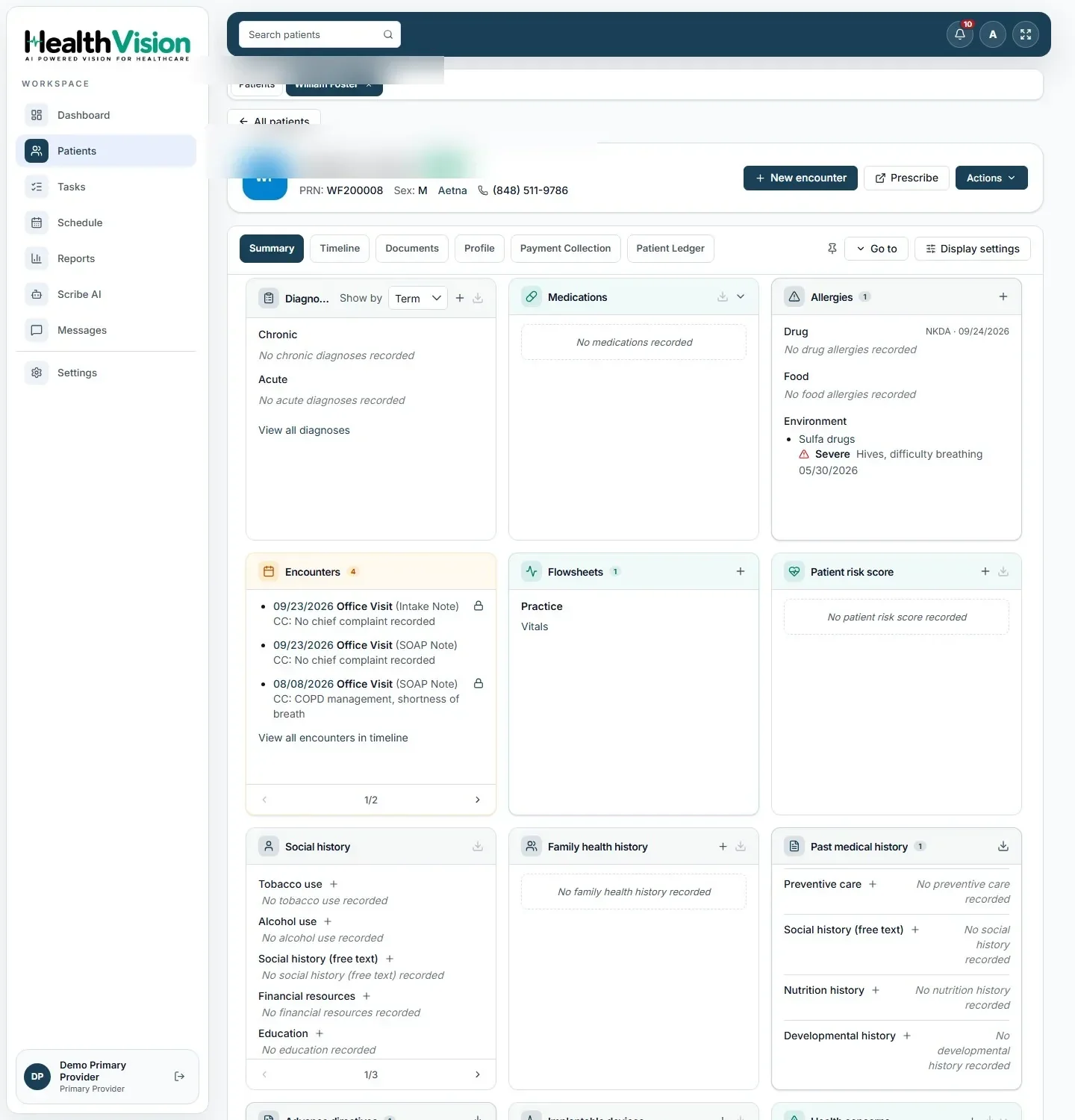
EHR PATIENT RECORDSPRODUCT SCREEN
Genuine HealthVision patient charts workspace showing health record information

Electronic Health Records

Create patient charts, document clinical encounters, and manage health information.

Appointment Scheduling

Set up provider calendars, manage bookings, and track appointment statuses.

Patient Registration

Maintain demographics, contact information, and insurance records.

e-Prescribing & Medication Management

Use supported electronic prescribing services and review medication information.

ScriptSure partner

Patient Portal

Give patients access to available appointments, health information, and secure messages.

Billing & Payments

Prepare superbills, review patient balances, and manage supported payment workflows.

A connected foundation for the work your practice does every day. Prescribing uses ScriptSure-connected services.Explore All HealthVision Features
CLINICAL TOOLS FOR YOUR NEW PRACTICE

Build Your Clinical Workflow Around the Way You Deliver Care.

Start documenting visits with organized patient records, configurable templates, prescribing tools, and connected clinical information.
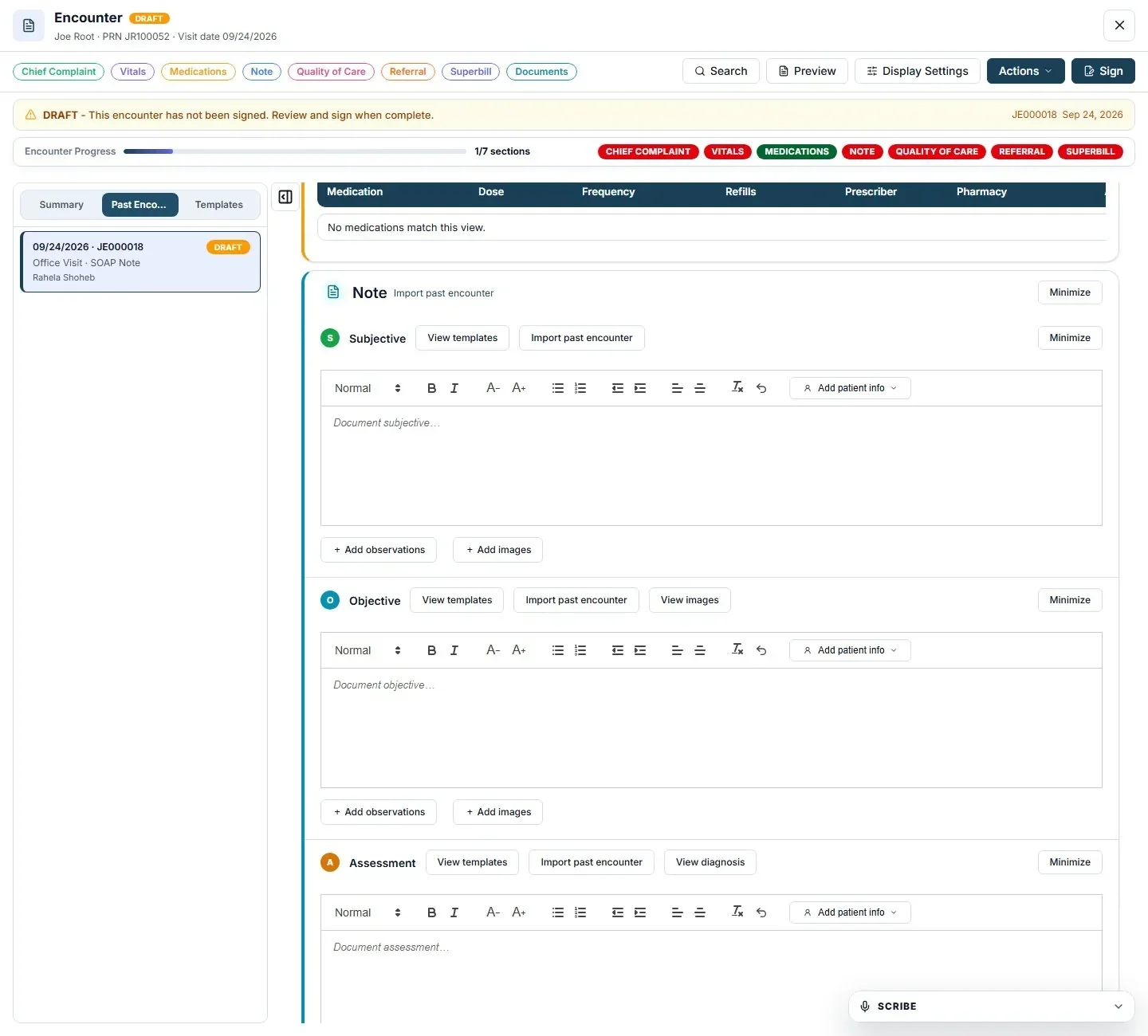
Inside the clinical workspaceGENUINE HEALTHVISION UI
Actual HealthVision SOAP note documentation editor
A Connected Clinical Foundation for Every Patient Visit.Actual HealthVision clinical documentation screens. AI Scribe remains pre-launch.
CONNECTED CLINICAL DOCUMENTATION

Clinical information in one place. Documentation shaped around care.

Review patient records and capture encounter notes, with supported prescribing and lab connections alongside the documented workflow.

SOAP note creationConfigurable notes and templates
e-Prescribing connectionScriptSure partner-supported
Diagnostic orders and resultsHealth Gorilla partner-supported
Explore EHR Features

SOAP Notes & Clinical Templates

Create structured encounter documentation using clinical notes and configurable templates.

SOAP editor details to confirm

Patient History & Chart Review

Access diagnoses, medications, allergies, vitals, and previous visits.

AI Medical Scribe

Prepare AI-assisted note drafts for clinician review and approval.

Documented pre-launch

Electronic Prescriptions

Manage supported prescription and refill workflows through connected prescribing services.

ScriptSure partner

Lab Orders & Results

Access supported laboratory and imaging orders and available results.

Health Gorilla partner

Care Plans

Document diagnoses, treatment decisions, and follow-up instructions.

e-Prescribing and supported lab orders rely on partner services. AI Medical Scribe is documented as pre-launch and requires physician review. Specific SOAP editor options can be reviewed in a demo.

PRACTICE SETUP & WORKFLOW PLANNING

Get the Right Workflows in Place Before Your First Patient.

A successful practice starts with clear processes. Explore how HealthVision can support the clinical and administrative workflows you’ll need as your practice gets started.

Provider appointment calendarACTUAL HEALTHVISION SCREEN
Actual HealthVision provider calendar from the product documentation
STEP 01

Organize Provider Scheduling

Plan appointments and manage provider calendars.

1 of 5 steps
Explore a workflow plan for your new practice. Specific setup arrangements are reviewed with the HealthVision team.Discuss Your Practice Setup
CONNECTED PRACTICE MANAGEMENT

Take Care of the Business Side. Stay Focused on Patient Care.

Bring scheduling, insurance checks, staff coordination, and billing information together so your new practice can manage daily operations from one workspace.
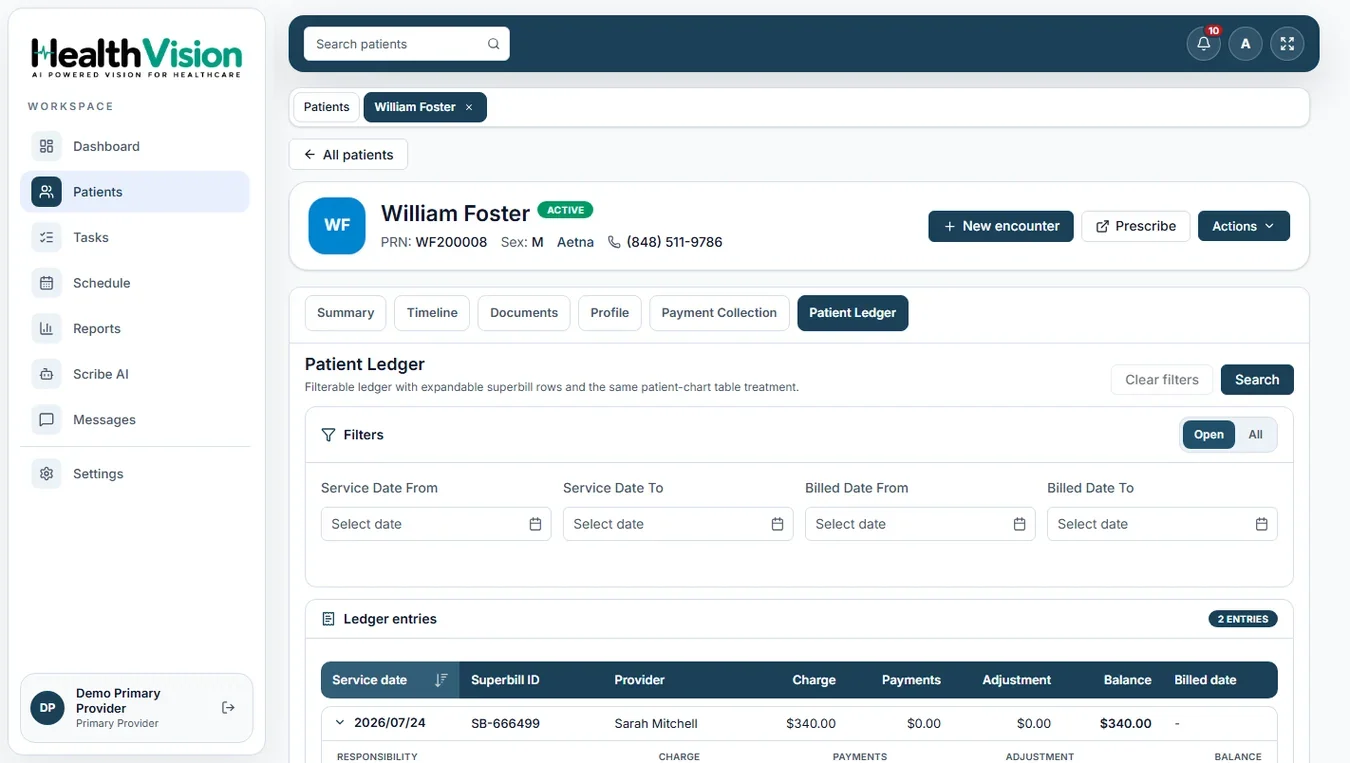
Patient billing and recorded payment activityACTUAL PRODUCT SCREEN
Actual HealthVision patient ledger screen showing charges and recorded patient payments
Genuine HealthVision billing workspace. Partner services support eligibility and electronic claims.

Daily Operations. Connected to Clinical Care.

Patient Check-In

Manage visit statuses and registration details.

Insurance Eligibility

Review supported coverage information through connected payer services.

Staff Task Management

Assign tasks and follow administrative follow-ups.

Superbills & Charge Capture

Prepare billing information from clinical encounters.

Patient Balances & Payments

Review charges, balances, and recorded payments.

Practice Reporting

Access available scheduling, financial, and operational reports.

Explore Practice Management
PATIENT ENGAGEMENT FOR NEW PRACTICES

Make Every Patient Interaction Count. From the First Appointment.

Give patients convenient ways to connect with your practice before and after visits through the HealthVision Patient Portal.

Online Appointment Booking

Let patients schedule and manage supported appointments.

Secure Patient Messaging

Communicate with patients between visits.

Health Records & Results

Share available clinical information and released test results.

Appointment Reminders

Support patient communication with available reminders and notifications.
Explore Patient Portal
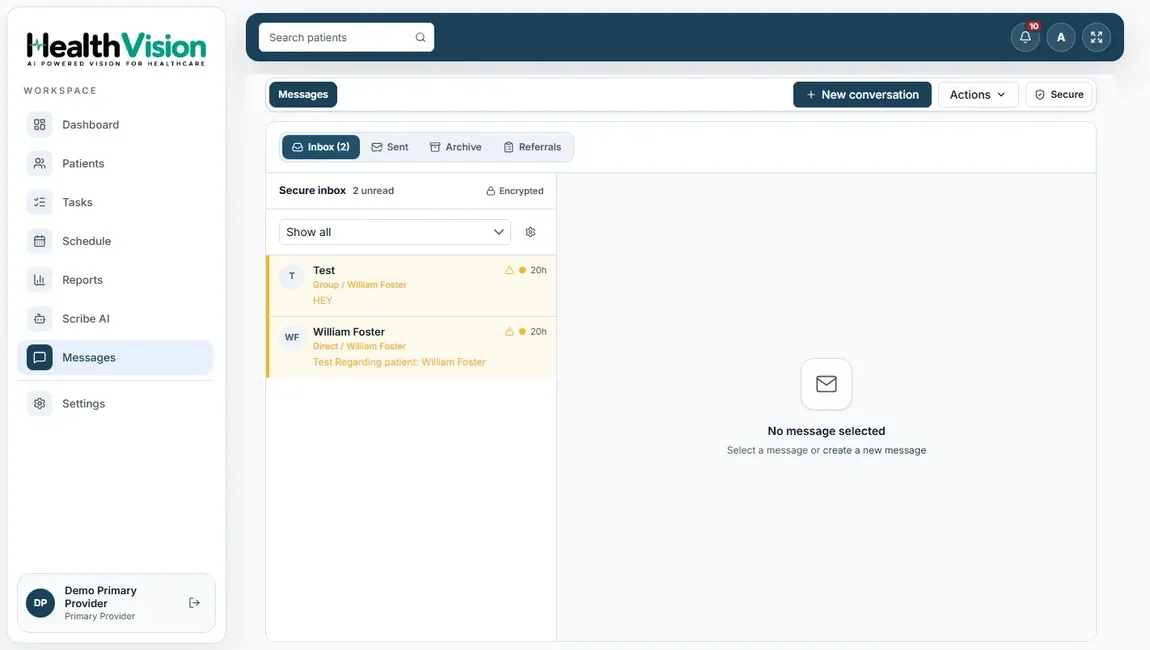
Actual HealthVision messaging workspace showing practice communication records
A Connected Patient Experience from Your First Day of Care.

Appointments, records, and messages linked with the care experience.

FREQUENTLY ASKED QUESTIONS

Your New Practice EHR Questions. Answered.

Explore what you need for scheduling, documentation, prescribing, patient access, billing, and getting your new practice ready.

Still have questions? Contact us
READY TO START WITH HEALTHVISION?

Your New Practice Starts with a Plan. Let’s Build It Together.

Explore the EHR, scheduling, clinical documentation, patient engagement, and billing workflows your practice needs. Connect with the HealthVision team to discuss your setup requirements.

PERSONALIZED PRODUCT WALKTHROUGHExplore the software foundation for your practice.
Scheduling & patient recordsClinical documentation & prescribingBilling & patient engagement
Request a Demo Contact Our Team