
Browse available appointment options and choose a suitable visit time.
PATIENT PORTAL SOFTWARE FOR MEDICAL PRACTICES
Better Access for Patients. Better Connections for Your Practice.
Give patients convenient access to appointments, health records, lab results, secure messages, and online payments, all through a connected patient portal designed to work with HealthVision EHR.
Online Appointment SchedulingSecure Patient MessagingHealth Records & Lab ResultsOnline Billing & PaymentsConnected EHR & Patient Portal
 Health, at your fingertips
 Patient self-serviceCONNECTED
Appointments↗
Health records↗
Secure messages↗
PATIENT HEALTH RECORDS
Your Health Information. All in One Place.
Give patients access to their available medical history, medications, allergies, lab results, and published visit notes, helping them stay informed about their health between appointments.
PATIENT RECORD EXPLORERINTERACTIVE PREVIEW
HealthVision · Patient PortalPATIENT VIEW
Overview
Records
Appointments
Messages
Billing
HEALTH INFORMATION
Medical history
A centralized view of available health information.
Documented conditionsView details ↗
Medication recordsAvailable
Allergy informationAvailable
Vital signsView history ↗
Illustrative portal interface. Replace with an approved HealthVision Patient Portal screenshot.
ONLINE APPOINTMENT MANAGEMENT
Give Patients More Control Over Their Appointments.
From booking a visit to managing schedule changes, HealthVision gives patients a convenient way to handle their appointments while keeping practice schedules connected.
Choose from applicable provider availability and appointment options.
Review the visit details before confirming or submitting the appointment request.
Keep track of supported appointment details in one convenient place.
Use supported scheduling options to request changes or view updated appointment details.
APPOINTMENT JOURNEY · 01 / 05YOUR VISIT, SIMPLIFIED
PATIENT APPOINTMENTS
Find an Appointment
Browse available appointment options and choose a suitable visit time.
Illustrative journey. Exact scheduling options depend on practice configuration.
PATIENT PORTAL CAPABILITIES
Everything Patients Need, Beyond the Office Visit.
Explore the self-service tools that help patients stay connected to their care and handle everyday healthcare tasks.
Appointments
Book, view, and manage supported appointments.
Secure Messaging
Exchange messages with the care team.
Health Records
Access available medical information and published notes.
Labs & Results
Review released test results and available trends.
Online Payments
View statements and pay eligible balances online.
Care Plans
Access provider-defined care goals and instructions.
Portal options depend on your practice settings and released information.

PORTAL MESSAGESEXAMPLE
I have a question about my follow-up instructions.
Secure messaging for routine care questions
SECURE PATIENT COMMUNICATIONExplore Patient Communication
Keep the Conversation Going Beyond the Visit.
Support ongoing patient communication through secure two-way messaging. Patients can contact their care team, receive responses, and revisit conversations through the portal.
Message Your Care Team
Give patients a direct channel for non-emergency questions and routine communication.
Stay Connected After Visits
Share follow-up information and care-related messages without relying solely on phone calls.
Keep Conversations Organized
Give patients a place to access available messages and responses.
CONNECTED TO HEALTHVISION EHR
From Your EHR to Your Patient. Connected.
HealthVision connects patient-facing activities with clinical and administrative workflows through a shared patient record, helping practices keep appointments, released health information, messages, and billing details aligned.
Patient appointment activity stays connected to the practice schedule.
Provider-published information becomes available according to access settings.
Secure patient messages support communication between visits.
Patient statements and online payments connect with billing records.
ONE PATIENT RECORD. TWO EXPERIENCES.CONNECTED CARE
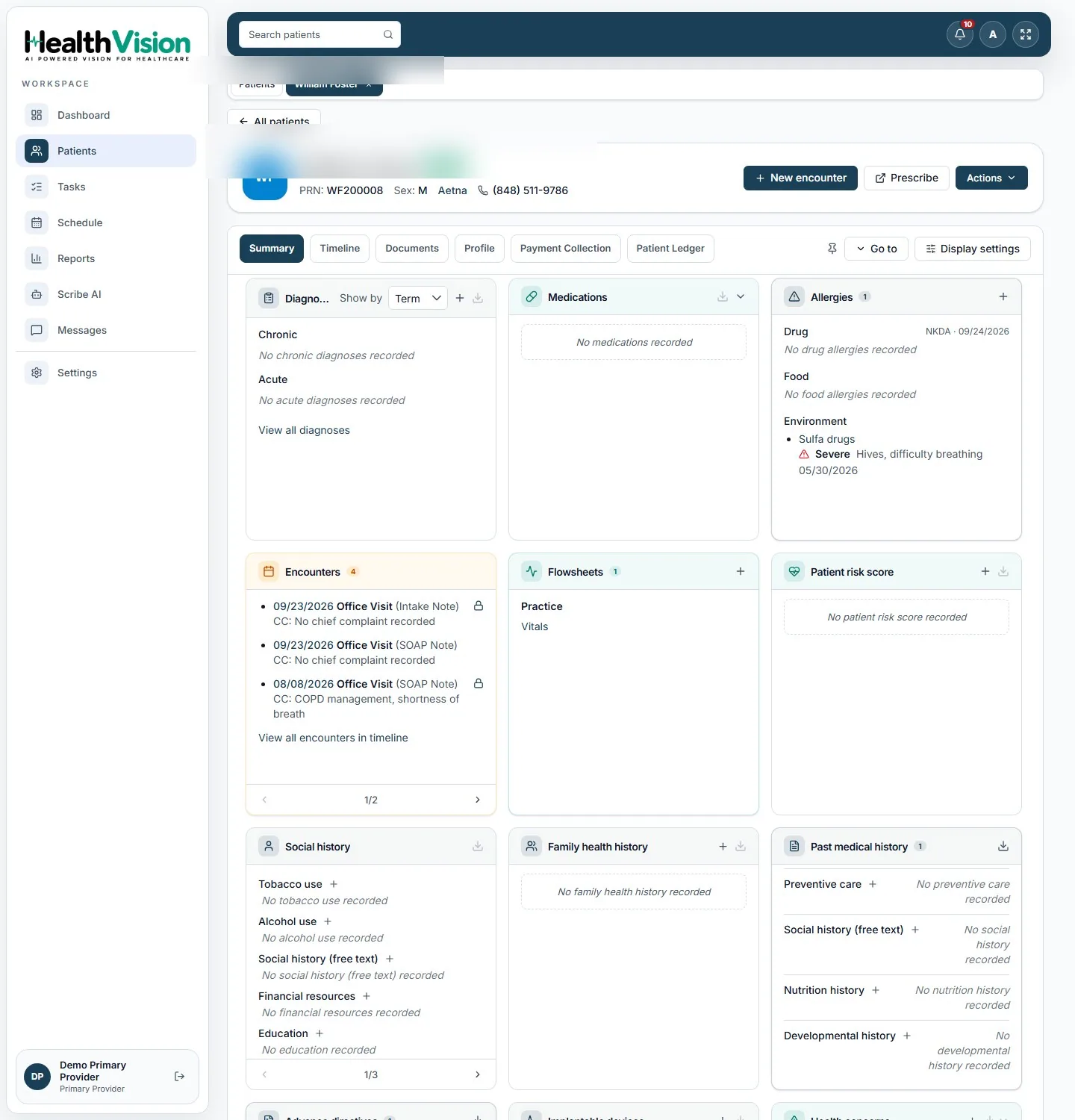
PROVIDER EHRACTUAL HEALTHVISION SCREEN
PATIENT PORTALILLUSTRATIVE VIEW
My health
♧Appointments↗
▤Health records↗
✉Messages↗
◉Payments↗
One Shared Patient Record. Two Connected Experiences.
PATIENT PORTAL SETUP & ACCESS
A Simpler Way to Welcome Patients Online.
Give patients access to their portal through a connected registration process, then help them get started with appointments, health information, and communication.

A welcoming digital front doorAppointments, records, and care information within reach
HOW IT WORKS
CONNECT
Register the Patient
Create or confirm the patient record in HealthVision EHR and provision portal access.
ACTIVATE
Set Up Portal Access
Guide the patient through the applicable account-access and sign-in process.
ENGAGE
Start Using the Portal
Patients can manage supported appointments, view released records, send messages, and review bills.
PATIENT ACCESS & PRIVACY
Give Patients Access. Protect Sensitive Information.
Support appropriate patient access to health information while maintaining controls over published records, user access, and sensitive clinical content.
THOUGHTFUL ACCESS
Give patients the information they need, with appropriate access controls.
Health information is made available through supported account, record-release, and confidentiality settings.
AccessConfidentiality
Account Access
Provide patient-specific portal access through supported sign-in controls.
Controlled Record Sharing
Make supported clinical information available when released or published for patient access.
Sensitive Information Controls
Apply documented confidentiality restrictions to protected Behavioral Health content.
Disclosure Visibility
Give patients access to available privacy and information-sharing details.
FREQUENTLY ASKED QUESTIONS
Your Patient Portal Questions. Answered.
Straight answers to common questions about portal access, patient communication, and getting started.
Have a question about your practice?
Talk with our team about the patient portal experience and available configuration options.
Contact HealthVisionPatients can access available records, manage supported appointments, review released results and visit notes, exchange secure messages, and view statements and payments.
HealthVision EHR and the Patient Portal are designed as connected experiences. Supported appointments, provider-published information, messages, and billing activities are linked through shared patient information.
Patients can use supported online appointment options. Available booking and schedule-change functions depend on your practice's configuration.
The portal includes secure two-way messaging for routine, non-emergency communication between patients and their care teams.
Patients can view available lab results, published clinical notes, and visit information once these records have been released for portal access.
The portal is designed to show supported patient statements and let patients pay eligible balances online. Payment availability depends on the practice's enabled services.
Please ask our team to confirm availability and supported devices for a dedicated HealthVision Patient Portal mobile app.
The setup process involves preparing patient records in HealthVision EHR, provisioning applicable portal access, and guiding patients through sign-in and supported self-service features. Your team can discuss the exact process during a demo.
READY TO CONNECT WITH YOUR PATIENTS?
See How HealthVision Brings Patients and Practices Together.
Explore patient self-service, secure communication, health records, appointments, and online payments in a personalized HealthVision Patient Portal demo.